Once Human Scenarios, Seasons, and Wipes: Character Migration, Eternaland, and Permanent Servers
The word "wipe" strikes fear into the heart of any survival sandbox veteran accustomed to watching hundreds of hours of progress vanish overnight. In the Once Human season model, the rules are entirely different: servers are temporary, but your character is permanent. A six-week scenario cycle does not reduce your achievements to dust; instead, it reboots stagnant server economies and unlocks fresh reserves of Starchrom. Here is a breakdown of how seasonal phases work, how long the settlement window lasts, and where your hard-earned materials go.
Quick Take: Each scenario lasts an average of 6 weeks and is divided into 6 sequential phases. The first 5 phases progressively unlock high-level territories, gear tiers from Tier I to Tier V, and world bosses. The final Settlement Phase (Phase 6) provides an off-season window of up to 4 weeks, allowing players to either sign up for a new scenario or transition to a permanent server. All blueprints, weapon accessories, gear mods, and premium currencies are permanently bound to your Meta-Human account.
Seasonal Structure in Once Human: Why Progress Is Never Wasted
Traditional MMOs frequently suffer from infinite resource inflation: six months after launch, newcomers cannot catch up to veterans, market economies collapse under mountains of hoarded ingots, and dominant clans monopolize every strategic territory. Once Human bypasses this stagnation by dividing player progression into two separate layers:
- Account Meta-Progression: Your unlocked weapon and armor blueprints, enhanced blueprint stars (1★–6★), level 17 gear mods, weapon accessories, and currencies (Starchrom, Stellar Planula) remain with you permanently. A full breakdown of Starchrom management is available in our Starchrom and Blueprint Progression Guide.
- Server Instance State: Physical base walls in the wilderness, character level, and raw copper or iron ores are bound to that specific seasonal instance. When a scenario concludes, unused building materials and items do not vanish; they automatically transfer to your personal cross-season storage on Eternaland.
Starting from scratch is out of the question. You enter each new season with a full arsenal of battle-tested blueprints in your back pocket, ready to hit the ground running on a level playing field.
Chronology of the 6 Scenario Phases: From Drop to Endgame
Every scenario follows a structured seasonal timeline. Content is gated behind scheduled phase unlocks, preventing players from blitzing the entire campaign in 48 hours. A standard scenario unfolds across 6 distinct stages:
- Phase 1: Initial Arrival and Survival Basics (Duration — 7 Days). Only starter low-level regions are open. Equipment crafting is capped at Tier I – Tier II, and advanced workbenches remain locked. Players establish baseline camps, capture utility Deviations, and learn movement fundamentals. For essential landing advice, check our Beginner Guide.
- Phase 2: Regional Expansion and Heavy Industry (Duration — 7 Days). The map expands eastward or northward. The level cap rises to unlock Tier III gear crafting, world purification defense events begin, and initial Prime Wars launch on Easy difficulty.
- Phase 3: Advanced Tech and Elite Dungeons (Duration — 7 Days). High-tier territories open alongside Tier IV gear. Securement Silos and Monolith dungeons unlock Hard difficulty, offering epic and legendary mods with elevated substat rolls.
- Phase 4: Endgame and Maximum Equipment Tier (Duration — 7–10 Days). The entire territory map becomes accessible, unlocking Tier V maximum gear. Nightmare difficulty opens, and territory purification allows up to 40 high-tier Eclipse Cortices per week.
- Phase 5: Seasonal Climax and World Boss Raids (Duration — 7–10 Days). The narrative climax of the scenario. Massive world events go live, featuring titanic encounters against Great Ones such as the Manibus, Forsaken Giant, or Chaosweavers. Preview banners for upcoming scenarios appear in the event interface.
- Phase 6: Settlement Phase (Duration — Up to 28 Days). Active story progression concludes. The server enters a peaceful wrap-up period: casual players clean up remaining crates and milestone goals, while veterans pack their inventories and register for their next destination.
| Scenario Phase | Average Duration | Equipment Tier Cap | Key Activity Focus |
|---|---|---|---|
| Phase 1 | 7 Days | Tier I – Tier II | Establish base territory, capture starter Deviations, reach level 20. |
| Phase 2 | 7 Days | Tier III | Launch Prime Wars, build automated electric furnaces, expand base limits. |
| Phase 3 | 7 Days | Tier IV | Farm Hard Silos, optimize gear calibration, craft advanced drills. |
| Phase 4 | 7–10 Days | Tier V (Max) | Tackle Nightmare dungeons, purify 40 Level 3 Cortices (4,000 Starchrom). |
| Phase 5 | 7–10 Days | Tier V + Level 17 Mods | Defeat Great Ones, finish season milestones, review upcoming scenario rosters. |
| Phase 6 (Settlement) | Up to 28 Days | Tier V | Casual exploration, sign up for next scenario, or migrate to permanent servers. |
Hourglass Tracker and Season Goals: Claiming Mitsuko's Marks
To monitor server pacing, an Hourglass Timer is permanently pinned to the top-right corner of the HUD. Pressing the «F3» key opens the Events menu, housing your complete seasonal navigation hub:
- Scenario Phase Tab: Displays a live countdown timer in days and hours until the next phase unlock, along with an overview of accessible map sectors.
- Season Goals: Each phase offers a distinct series of combat, exploration, and crafting challenges. Completing these milestones awards account experience and valuable Mitsuko's Marks.
- Scenario Shop: Mitsuko's Marks can be redeemed directly for exclusive cosmetic outfits, decorative furniture packs, and guaranteed Deviation loot crates. Unspent marks convert to Eternaland currency at season conclusion.
- Journey Tracker («J» Key): A persistent record of your Meta-Human achievements, tracking completed Monolith clears, world bosses defeated, and account mastery points.
All Once Human Scenarios: Manibus, Way of Winter, Endless Dream, PvP, and Isles of Abyss
Selecting a server in Once Human extends far beyond picking a regional ping or server number. Each server represents a self-contained world operating under distinct environmental rules, temperature hazards, enemy mutations, and world event schedules. Modern Once Human scenarios encompass classic cooperative PvE campaigns, faction-based PvP arenas, pet-breeding sandbox environments, and open-ocean archipelagos. Understanding the core distinctions between these scenarios ensures you assemble the right weapon build, organize your squad, and avoid dropping into a blizzard without thermal gear.
Quick Take: Scenarios are grouped into three major categories: cooperative PvE exploration (Manibus, The Way of Winter, Endless Dream), competitive PvP realms (Evolution's Call, Prismverse's Clash), and specialized thematic sandboxes (Isles of Abyss, pet-fusion scenarios). Server difficulty modifiers (Normal, Hard, or Nightmare) directly dictate monster durability, sanity decay severity, and drop rates for Level 17 gear mod crates.
PvE Campaign Routes: From Eastern Nalcott to Frozen Arkam
For players focused on world exploration, high-tier dungeon clears, and narrative campaigns, the game provides four distinct PvE environments:
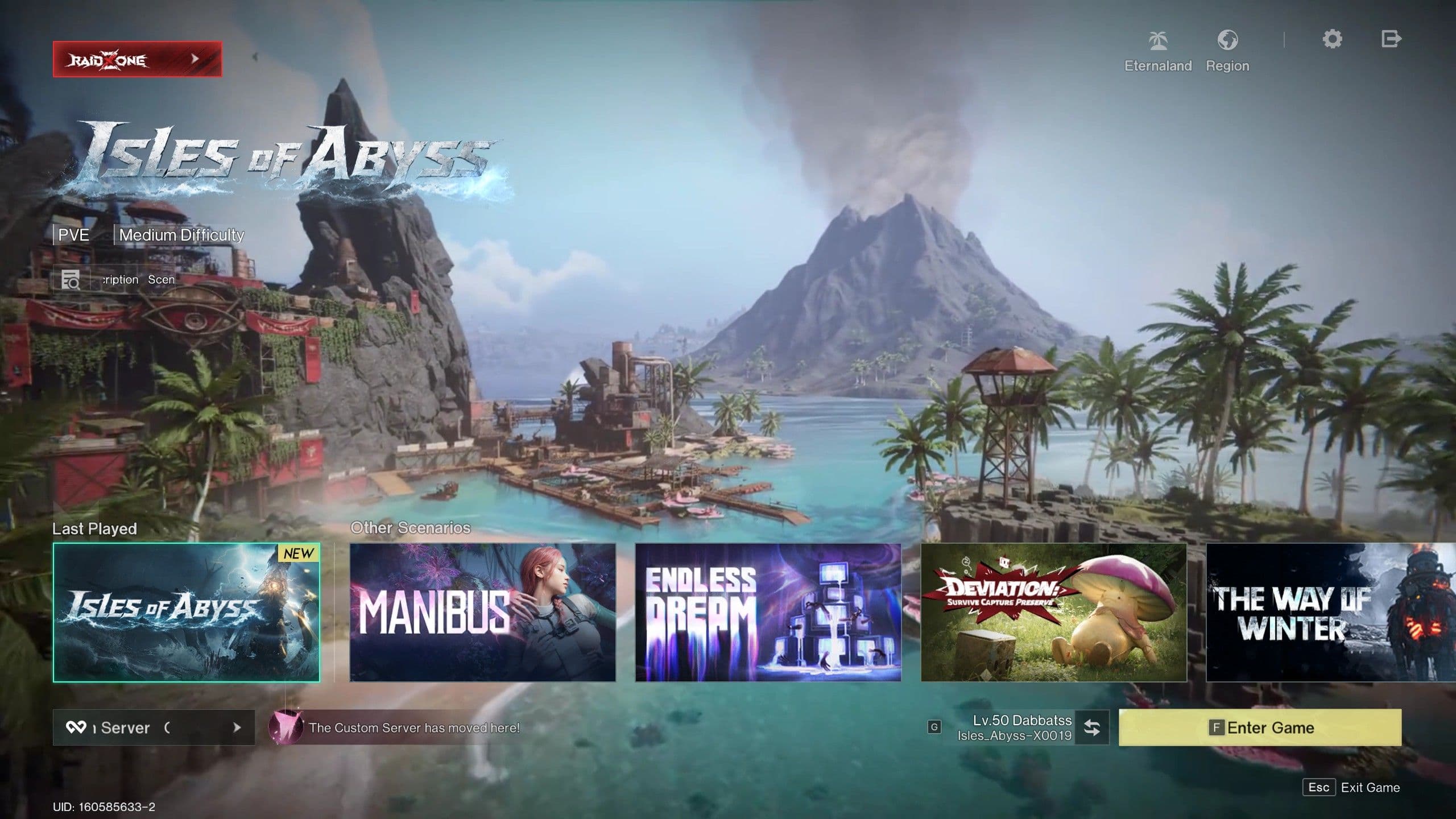
- Manibus: The foundational PvE experience set across Eastern Nalcott. The map spans 5 climatic zones, stretching from the sandy coastlines of Dayton Wetlands to the polluted wastelands of Blackfell. Endgame progression revolves around coordinating Prime Wars, storming the LEA Research Lab, and defeating the titanic Manibus. For comprehensive boss mechanics, review our Bosses, Silos, and LEA Lab Guide.
- The Way of Winter: An unforgiving northern scenario set in the sub-zero Arkam region. Survival is dictated by extreme temperature survival: players face freezing blizzards causing hypothermia or searing geothermal vents causing heatstroke. Progression centers on constructing Thermal Towers, mining Chaosium, and tackling wandering colossi known as Chaosweavers.
- Endless Dream: Built for seasoned survivalists, unlocking the entire world map on Day 1 without phase time-gates. The landscape is warped by shifting Dream Zones that dynamically alter gravity, pollution toxicity, and elite enemy behaviors, demanding rapid tactical adaptation.
- Deviation: Survive, Capture, Preserve: A specialized campaign centered around hunting, breeding, and mutating companion pets. Features the Fusion Pod workbench for combining Deviations, inheriting traits, and competing in dedicated pet dueling arenas.
PvP Scenarios: Faction Battles and Frontier Raids
For players seeking high-stakes territorial warfare and base raiding, competitive scenarios feature unrestricted engagement zones and defensive siege mechanics:
- Evolution's Call: The original guild warfare format. Hives and large Warbands clash for supremacy over Frontier Zones and automated resource extractors. In the endgame, conflict centers on intercepting and escorting Echoid caravans, which temporarily expose bases to full structural destruction.
- Prismverse's Clash: A server-wide faction war dividing the population into two opposing armies: the corporate Rosetta and the insurgent Mayflies. Battles erupt over securing rare Prismatic Deviations, which confer powerful server-wide buffs to gathering yields and weapon damage.
Oceanic Expansion: Isles of Abyss
This major expansion relocates survivors to a scattered tropical archipelago where overland vehicles are obsolete, shifting gameplay toward maritime navigation:
- Shipbuilding and Modular Floating Fortresses: Your territory boundary adapts to sea vessels. Players construct motorized catamarans, armored gunboats, and multi-deck floating bases outfitted with generators and automated turrets. Check our complete vessel roster in the Vehicles, Garage, and Ships Guide.
- Underwater Combat and Scuba Diving: Plunge into sunken ruins, hunt marine mutations using harpoons and melee weapons, and salvage submerged mystical crates.
- Ocean Leviathans: Open-water world bosses that require naval fleet formations and coordinated deck artillery barrages to bring down.
Scenario Difficulty Modifiers: Normal, Hard, and Nightmare
When selecting a server, difficulty badges denote survival severity. This modifier remains locked for the duration of the season:
| Difficulty Tier | Survival Stat Strain | Dungeon Combat Challenge | Endgame Loot Quality |
|---|---|---|---|
| Normal | Baseline hunger and hydration depletion. Minimal sanity penalties. | Standard mob health pools and damage. No specialized elemental barrier shields. | Standard mod pool; standard weekly Starchrom yield from territory purification. |
| Hard | Accelerated sanity drain in polluted sectors. Stamina regeneration penalties. | Elites gain Void and Phase damage shields, requiring designated weapon builds. | Elevated drop rates for legendary mods with purple substat rolls. |
| Nightmare | Extreme environmental survival: lethal cold or heat, aggressive sanity collapse. | Enemies deal fatal burst damage; Monolith bosses feature exclusive enraged phases. | Guaranteed Level 17 mod crates featuring keyword target selection. |
Anatomy of a Season Wipe: Retained vs Reset Progress
For players accustomed to spending years stockpiling gear in traditional MMOs, the concept of a server wipe sounds alarming. In reality, Once Human season wipes are engineered specifically to safeguard your real-world time while removing tedious early-game grinds. The game draws an absolute line between your permanent Meta-Human account and the temporary matter of the seasonal instance. Once you understand this architecture, wipes stop feeling like a loss and reveal themselves as your primary pipeline for thousands of fresh Starchrom and top-tier mods.
Quick Take: At season transition, 100% of weapon and armor blueprints are permanently preserved alongside their star enhancements (1★–6★), weapon accessories, gear mods, premium currencies (Starchrom, Stellar Planula), captured Deviations, and territory structural blueprints. Only instance-bound entities reset: character level (back to Lv. 1), physical world structures, map fog of war, and the Tech Tree. All stockpiled chest materials are automatically evacuated to your Eternaland depot.
Progression Architecture: Account Database vs Temporary Realm
To navigate wipes with total confidence, you only need to understand the two independent data layers governing your Once Human profile:
- Permanent Account Database: The global profile of your character. This holds your technological knowledge, crafting recipes, Battle Pass unlocks, cosmetic skins, and currency wallets. No seasonal wipe touches this data — it is tied to your account indefinitely.
- Temporary Scenario Instance: The physical reality of a specific server. This includes the spatial coordinates of your wooden cabin in the woods, stockpiles of raw copper ingots, tomato patches, and character level progression up to 50. This layer resets when a scenario ends to refresh the competitive landscape and restore the wilderness for new arrivals.
Complete Inventory of What Is Kept Permanently (100% Data Preservation)
Whenever you transfer to a new scenario (whether brave the sub-zero blizzards of The Way of Winter or engage in faction warfare), you immediately retain your most vital combat assets:
- Weapon and Armor Blueprints: Every formula you have ever unlocked remains accessible in your Blueprint library. If you upgraded a legendary sniper rifle or heavy machine gun to 4★ or 6★, that star rating carries forward completely. Once you gather baseline materials on a starter workbench, you can forge your favorite gear immediately without re-farming fragments.
- Weapon Accessories: All discovered optical scopes, tactical foregrips, compensators, laser sights, and extended magazines are instantly available in your weapon customization screen from Level 1.
- Gear Mods: Your entire collection of legendary mods, including upgraded tiers and Level 17 crates, moves seamlessly into your Spacetime inventory, ready to slot into freshly crafted gear.
- Premium Currencies: Your complete balance of Starchrom, Stellar Planula, and Sproutlets transfers intact. Detailed strategies for maximizing Planula yields are covered in our Interactive Map, Riddles, and Chests Guide.
- Deviation Companion Collection: All captured combat, crafting, and territory Deviations are carefully packed and transferred to your Eternaland depot. Their functional stats, including 5/5 skill ratings and rare mutant traits, remain intact.
- Territory Architectural Blueprints: House layouts saved via your Territory Terminal stay in your blueprint library. On a new server, simply locate a level clearing and deploy your saved mansion with a single click.
- Cosmetics and Battle Pass Rewards: Every weapon skin, outfit cosmetic, vehicle decal, emote, and Lightforge furniture item remains unlocked permanently.
What Resets on a New Server and Why It Benefits You
Instance resets can appear counterintuitive, but they serve as the vital engine powering Once Human's gameplay loop:
- Character Level (Reset to Lv. 1): If players spawned into new scenarios at Level 50, low-level regions would be obsolete and newcomers would stand zero chance in PvP. Re-leveling to 50 on a subsequent scenario is dramatically faster because you understand quest flow and craft using high-star blueprints.
- Tech Tree and Specializations («O» Key): Tech nodes and Cradle perks reset cleanly. This allows you to redesign your specialization perks around the demands of the new scenario (such as prioritizing thermal survival in northern snowfields over sulfur processing). Check our top perk rankings in the Memetics, Specializations, and Cradle Guide.
- Physical Base in the Wild: Structures disappear from the map, freeing up prime land for new players. Nothing is lost: all walls, storage chests, and workbenches deconstruct into raw materials and transfer to your Eternaland inventory.
- World Map Fog and Mystical Crates: The map is re-shrouded in fog of war. This is a massive boon for the player: every mystical crate, field riddle, and scenic overlook resets, allowing you to re-farm tens of thousands of experience points, Starchrom crates, and hundreds of Stellar Planula!
Data Migration Summary Table
| Game Element | Wipe Status | Location Post-Wipe | Availability in New Scenario |
|---|---|---|---|
| Weapon & Armor Blueprints | Preserved (100%) | Character Blueprint Menu | Immediately craftable at Level 1 with appropriate workbench. |
| Weapon Accessories | Preserved (100%) | Weapon Customization Screen | Equippable immediately on any compatible firearm. |
| Gear Mods | Preserved (100%) | Spacetime Backpack | Mountable onto freshly crafted gear of corresponding tier. |
| Starchrom & Planula | Preserved (100%) | Account Currency Wallet | Spendable immediately at Wish Machines and Severin's shop. |
| Captured Deviations | Preserved (100%) | Eternaland Depot | Importable via seasonal Materialization Points. |
| Chest Resources & Materials | Evacuated (100%) | Spacetime Backpack | Stored on Eternaland; importable within seasonal quota. |
| Character Level | Resets | Seasonal Profile | Re-levels from Lv. 1 through quests and exploration. |
| Tech Tree | Resets | Tech Menu («O» Key) | Re-unlocked using Tech Points earned from level progression. |
| Mystical Crates & Riddles | Refreshed | Scenario Open World | Fully lootable again for fresh XP, Starchrom, and Planula. |
Non-Shutdown Servers: Wipe-Free Sandbox and Migration Rules
Not every survivor wants to engage in a high-intensity seasonal sprint every six weeks. Many players prefer a relaxed, long-term pace: constructing sprawling architectural estates, breeding rare livestock lineages, automating complex petrochemical refineries, and hanging out with friends. To cater directly to this community, developers introduced Once Human permanent servers (Non-Shutdown Servers / Regular Servers). These are persistent game worlds with halted seasonal countdowns, where your territory footprint, electrical grids, and chest inventories remain intact for as long as you wish.
Quick Take: A Non-Shutdown Server is an ongoing world where the season clock has stopped. Servers naturally convert to this state after their Settlement Phase expires, or players can transfer to one voluntarily. Server wipes are completely deactivated: bases, crops, vehicle fleets, and hoarded metal ingots are permanently preserved. The compromise is an absence of fresh seasonal storylines and weekly Starchrom injection events. At any moment, players can leave a permanent server and register for a fresh competitive season.
What Are Permanent Servers and Who Are They Built For
Early in the game's lifecycle, mandatory seasonal resets created fatigue among casual builders and industrial gatherers: no sooner had an engineer wired up a massive hydroponic greenhouse or designed a glass mansion than the server timer ran out. In the modern game ecosystem, permanent servers provide a stable sanctuary for three main player profiles:
- Architects and Base Designers: The ability to erect monumental compounds without fear of losing intricate wiring networks, hydraulic plumbing lines, and automated conveyor setups. For wiring mastery, consult our Base Building, Electricity, and Water Guide.
- Agronomists and Animal Breeders: Breeding mutant crop variants, stabilizing rare seed genetics, and taming S-rank predators requires weeks of uninterrupted attention. On a permanent server, livestock never despawns and silos stay filled with fresh produce. For optimal breeding cycles, check our Farming, Taming, and Cooking Guide.
- Players with Limited Time: If you can only log in for a few hours on weekends, permanent servers free you from racing against strict weekly phase deadlines.
Permanent Worlds vs Seasonal Scenarios: Advantages and Compromises
Deciding between a permanent server and entering a fresh scenario comes down to your personal gameplay priorities:
| Gameplay Aspect | Permanent Server (Non-Shutdown) | Seasonal Scenario (Standard) |
|---|---|---|
| Server Lifespan | Indefinite (No Wipes) | Finite (6–8 Weeks on average). |
| Territory & Structures | Remain permanently deployed without inventory eviction. | Deconstruct into Spacetime Backpack at season conclusion. |
| Physical Resources | Warehouses of ores, fuels, and food are 100% preserved. | Transferred to Eternaland; imported via seasonal quota. |
| Starchrom Income | Static: no fresh scenario milestones or phase events. | Maximum: weekly purifications, phase goals, Prime Wars. |
| Scenario Hazards | Standard baseline survival parameters. | Dynamic seasonal hazards (Arkam blizzards, Dream Zones). |
Conversion Mechanics: How Servers Transition to Permanent Status
The transition to permanent status occurs automatically and seamlessly once a scenario's active narrative concludes:
- During the Settlement Phase (Phase 6), an in-game notification displays the countdown timer until server retirement.
- If you do not register for a new scenario before the 28-day settlement period concludes, the system automatically converts your current instance into a Non-Shutdown Server (or transfers your base intact to an active regional permanent server).
- Your territory maintains its exact geographical coordinates, while all workbenches, generators, and crop plots continue functioning normally. Your character retains their Level 50 cap, unlocked formulas, and equipped gear.
Returning to the Competitive Arena: How to Leave a Permanent Server
Settling on a permanent server is never a one-way trip. Whenever an exciting new scenario launches or your Hive recruits you for a fresh campaign, you can re-enter the competitive circuit at will:
- Submit Scenario Application: Press the «F3» (Events) or «Y» (Sign Up) key, browse the roster of active scenarios, and confirm your destination.
- Automated Asset Packaging: The moment you confirm transfer to a new scenario, your permanent base is saved as an architectural blueprint, while all chest contents and inventory items instantly route to your Spacetime Backpack on Eternaland.
- Spawning into the New Realm: You land on the new seasonal server at Level 1, retaining every blueprint, mod, and currency, with your full quota of Materialization Points ready to deploy essential tools.
Eternaland: Personal Pocket Dimension, Island Workshop, and Astral Sand
Between grueling seasonal campaigns and clearing contaminated ruins, every Meta-Human requires a sanctuary shielded from environmental catastrophes and server wipes. That refuge is Eternaland in Once Human — a sovereign pocket dimension belonging exclusively to you. Free from Stardust pollution hazards, aggressive roaming hostiles, and neighboring base claims, Eternaland removes standard territory building restrictions, serving as your personal creative testing ground and central cross-season logistics depot.
Quick Take: Eternaland is accessible anytime through the main menu via the «Esc» key. It is completely immune to server wipes, acting as a permanent homestead, an evacuation depot for all seasonal resources, and an unrestricted architectural sandbox. Its primary currency is Astral Sand, generated by recycling surplus seasonal gear and fulfilling Island Orders. Players can construct massive architectural designs without grid constraints and invite friends across any server in their region.
Core Functions of Eternaland: A Realm Beyond Server Timelines
Eternaland fulfills three essential operational roles within the Once Human ecosystem:
- Inter-Season Logistics Hub: At the conclusion of each scenario, your assets flow here. Rather than forfeiting earned materials, your items are securely deposited into Eternaland's limitless Spacetime storage.
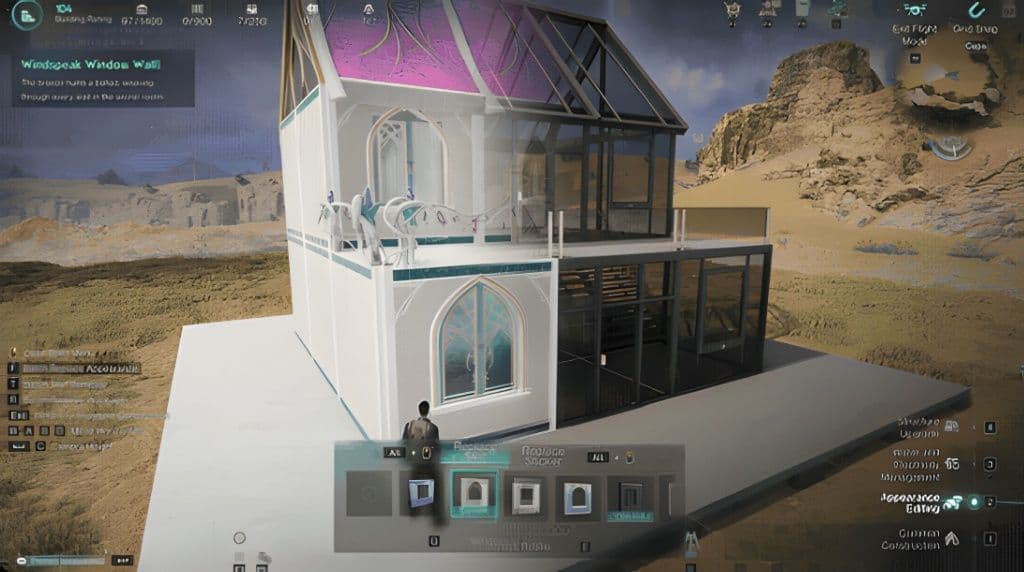
- Uncapped Creative Sandbox: Unlike open-world territories bound by strict Territory Terminal quotas (up to 1,400 structural blocks), Eternaland provides substantially expanded building limits. You can experiment with intricate structures, test multi-tier layouts, and export saved designs directly into blueprint libraries. Design principles are covered in our Base Building, Electricity, and Water Guide.
- Cross-Server Social Lounge: Eternaland operates on a cross-server instancing layer. You can invite friends to visit your island, host social gatherings, and organize private minigames, even if they play on a different server within your region.
Accessing Your Island: Fast Travel via the «Esc» Menu
Access to Eternaland unlocks early in the campaign following initial tutorial quests. You can travel to your private island from virtually anywhere in the open world:
- Press the «Esc» key on your keyboard to open the main system interface.
- Select the Eternaland tile located on the right side of the screen.
- Confirm teleportation. Your character instantly transfers to the central pier of your island without consuming energy links or vehicle fuel.
- Returning to your scenario server is just as fast: open the «Esc» menu and select "Leave Eternaland". You will materialize at the exact coordinates from which you departed.
Island Economics: Astral Sand and the Island Workshop
Standard Energy Links do not circulate on your private island. Internal transactions, structural construction, and decorative crafting rely entirely on a dedicated resource: Astral Sand. Island administration centers around the Island Workshop terminal:
- Island Workshop: The administrative terminal near the docks. Here you configure environmental settings (weather, day/night cycles, gravity parameters, visitor permissions) and craft island-exclusive decorative blocks.
- Astral Sand: The universal building currency of Eternaland. Foundations, walls, and furnishings constructed on the island consume Astral Sand instead of raw lumber or stone, eliminating the need to chop trees on your private estate.
Recycling Seasonal Loot: Turning Clutter into Building Currency
When a scenario wraps up, your Spacetime storage fills with stacks of obsolete weapons, low-tier ammunition, coarse cloth, and basic copper ingots. Importing these into a new season is impractical due to point caps. The most profitable use for this surplus is recycling it into Astral Sand:
- Interact with the Island Workshop and navigate to the Material Recycling tab.
- Select unwanted items from your Spacetime inventory (outdated firearms, surplus minerals, spoiled food, excess components).
- Confirm recycling: the terminal breaks the items down into an equivalent sum of Astral Sand.
- Recycled sand permanently credits to your island balance, funding massive architectural builds and custom furniture recipes.
Island Orders: Weekly Material Delivery Contracts
To ensure a continuous supply of Astral Sand, the workshop features a weekly contract system known as Island Orders:
| Order Type | Required Submission Resources | Astral Sand Payout | Refresh Cycle |
|---|---|---|---|
| Basic Raw Material Order | Lumber, iron ore, gravel, purified water. | 1,000 – 3,000 Sand | Weekly (every Monday). |
| Industrial Supply Contract | Steel ingots, refined fuel, electronic components. | 5,000 – 8,000 Sand | Weekly. |
| Gourmet Culinary Delivery | Canned long-life rations, jerky, mutant crops. | 10,000+ Sand | Bi-weekly. |
Cross-Server Multiplayer and Collaborative Building
Eternaland serves as an exceptional venue for social downtime. Through the island console, the owner can customize visitor permissions:
- Open Guest Access: Any player on your friends list can teleport directly to your island via the Social menu («U» key).
- Co-Builder Permissions: You can grant trusted Hive members building privileges, allowing your team to collaborate on shared monuments or race tracks directly on your terrain.
- Architectural Blueprint Export: Any successful structure built on Eternaland can be saved into your blueprint library and immediately deployed onto your seasonal territory in future scenarios.
Spacetime Backpack and Materialization Points: What to Carry into a New Season
Your first few hours on a fresh server set the trajectory for your entire month of gameplay. Players who master the rules of seasonal logistics gain a massive head start over the competition: while other survivors are chipping away at gravel with stone pickaxes and foraging for wild berries, a prepared veteran is already drilling sulfur in bulk and firing up industrial electric furnaces at Level 5. The mechanical key to this rapid snowball is Materialization Points in Once Human (Logistics Points) — a dedicated seasonal allowance that lets you withdraw essential assets from your Eternaland depot into the active seasonal realm.
Quick Take: Every new scenario grants each player a fixed budget of 20,000 Materialization Points. These points are spent to pull items from your Spacetime Backpack directly into your active inventory. Your Day 1 priority should be an Advanced Electric Drill with a high-yield mining trait (~1,000 points), two or three utility Deviations with 5/5 skill ratings (500–800 points each), and a starter packet of rare crop seeds. Spending points on Tier V weapons or raw copper ingots is a costly blunder that wastes your seasonal allowance.
Spacetime Backpack: Accessing Cross-Season Storage
Whenever a scenario concludes, your territory chests, industrial facilities, crop harvests, and backpack contents are automatically archived into your Spacetime Backpack (Eternaland Depot):
- Accessing the Depot on a New Server: Press the «I» key to open your inventory. On the top navigation bar, click the rightmost hourglass icon to display your Spacetime storage.
- Infinite Capacity: This depot has no encumbrance limit or slot ceiling. Items gathered across multiple past scenarios remain stored here indefinitely.
- One-Way Import Gateway: Materialization operates strictly one way. Once an item is imported into an active seasonal server, it cannot be returned to Eternaland until that server's scenario concludes.
The 20,000 Materialization Point Budget: Cost Breakdown
To preserve competitive fairness and prevent players from instantly dominating fresh servers with endgame armories, developers enforce a seasonal cap of 20,000 points. Every item category carries a specific point tariff:
| Item Category | Example Item | Materialization Cost | Investment Efficiency |
|---|---|---|---|
| Electric Gathering Tools | Advanced Electric Drill, Chainsaw | 800 – 1,200 Points | Essential (S-Tier): completely eliminates early gathering bottlenecks. |
| Utility Deviations | Digby Boy, Butterfly, Chefosaurus (5/5 Rating) | 500 – 800 Points | High Priority (A-Tier): automated ore mining and cooking buffs from Day 1. |
| Seeds & Fertilizers | Mutant crop seeds, specialized compost | 10 – 50 Points (per seed) | High Priority (A-Tier): rapid food and stamina buffs without foraging. |
| Calibration Blueprints | Targeted calibration blueprints, controllers | 100 – 300 Points | Moderate (B-Tier): useful for fine-tuning weapons once crafted. |
| Crafted Weapons & Armor | Tier V Legendary Assault Rifle | 8,000 – 12,000 Points | Poor (F-Tier): astronomical point cost locked behind level requirements. |
| Raw Basic Materials | Lumber, stone, copper ore, sulfur | 1 – 5 Points (per unit) | Worthless (F-Tier): gathered in minutes in open-world starter areas. |
Equipment Tier Restrictions: Why Endgame Weapons Are Locked on Day 1
A frequent beginner trap is attempting to spend half their 20,000 points on a favorite Tier V legendary rifle on their first evening. The game prevents this through two hard mechanics:
- Character Level Gating: All Tier V weapons and armor pieces require your character to reach Level 40 to equip them. Withdrawing high-tier combat gear at Level 5 simply clogs your backpack with dead weight that you cannot wield for weeks.
- Repair Material Costs: High-tier equipment degrades in combat. Repairing a Tier V rifle requires advanced alloys (tungsten, aluminum) and electronic components that do not spawn in starter zones during Phase 1.
The Day 1 Golden Basket: Optimal Import Strategy
To extract maximum return on investment from your 20,000 points, experienced veterans follow a proven Day 1 import blueprint:
- Advanced Electric Drill (with +100% mining yield trait): The single best import investment (~1,000 points). Lets you hoover up sulfur, copper, and iron nodes instantly without draining personal stamina. Tool specifics are detailed in our Ores, Crystals, and Mining Locations Guide.
- Electric Chainsaw: For ~800 points, it fulfills your territory lumber needs for an entire base in under three minutes of logging.
- Curated Utility Deviations (5/5 Rating): Import one Digby Boy for passive mineral gathering, one Chefosaurus for automatic cooking, and a Butterfly for boss weakspot marking. Total cost: approximately 2,000 points. Explore our full pet hierarchy in the Deviations and Pets Guide.
- High-Value Seed Starter Pack: Withdraw 5–10 seeds of wheat, aloe, and corn (~300 points) to plant your first greenhouse crop plots immediately and produce experience-boosting dishes.
- Reserve the Remaining 15,000+ Points: Keep the majority of your allowance untouched until Phases 4 and 5. This reserve is crucial for importing rare alloys, calibration blueprints, and specialized mutagens when finalizing your endgame raid loadout.
The Logistics Blacklist: What You Should Never Import
Scenario Registration Walkthrough, Hive Migration, and Comprehensive FAQ
Switching servers in Once Human is a critical team operation. A miscommunication from a squad leader or an uncoordinated start date can splinter a close-knit group across different servers or unlinked world instances. Executing proper scenario registration in Once Human ensures your entire Warband lands on the exact same server, claims adjacent territory spots, and hits the ground running without launch day queues. Here is a step-by-step walkthrough of group migration, world layer switching, and answers to the community's most pressing questions regarding progress preservation.
Quick Take: Registration for the next season opens during late Phase 5 and remains active throughout the Settlement Phase via the «Y» key. To migrate together, a team leader generates a Squad Code, allowing members of a Hive or Warband to reserve slots on the same server simultaneously. If teammates spawn into different instance mirrors, switching between World Layers (World 1–10) is done instantly and for free at any Teleportation Tower via the «G» key.
Registration Timeline: Booking Access via the «Y» Key
Transitioning between servers is never forced abruptly. The development roadmap provides ample warning, dividing scenario booking into two phases:
- Scenario Preview (Late Phase 5): Opening the Events menu via the «F3» key displays a preview banner for upcoming scenarios. Players can inspect opening schedules, regional server locations, difficulty ratings, and environmental mechanics.
- Active Registration (Phase 6): Pressing the «Y» key opens the reservation portal. Here you pick your target scenario, choose a difficulty modifier (Normal, Hard, or Nightmare), and select an exact server ID. Confirming locks in your slot, bypassing server capacity queues on opening day.
Solo Sign-up vs Squad Sign-up (Team Migration)
While solo players can simply pick an open server and confirm, coordinated groups and clans should utilize the built-in Squad Sign-up tool to guarantee unified migration:
- Generating a Squad Code: The team leader opens the registration menu («Y» key), selects the destination server, and clicks "Create Squad". The system produces an alphanumeric Squad Code.
- Distributing the Code: Squadmates press «Y», select "Join via Code", and input the combination.
- Synchronized Slot Reservation: All team members (up to 4 in a Hive or up to 30 in a Warband) are locked to the target server simultaneously. This eliminates scenarios where half your squad gains entry while the server caps out for the rest.
World Layers (World 1–10): Shifting Mirrors at Towers
Even on the same server, players might arrive at a designated outpost only to find their friends' bases invisible. This occurs due to server mirroring: each Once Human server runs multiple parallel instance layers (World 1, World 2, up to 10 layers) to prevent thousands of player structures from overlapping in prime building spots:
- Walk up to any unlocked Teleportation Tower in the wilderness.
- Press the interact key «G» ("Switch World").
- Select the specific world number where your friends have pitched their tents and confirm. Transfer is instant, free, and keeps your inventory intact.
- To bring your physical base territory into your friend's world layer, open Build Mode («B» key), press «Z» (Territory Relocation), and plant your foundation onto the active mirror.
Catch-up Mechanics and Simplified Journey Mode
If real-life commitments cause you to miss server launch day, the game incorporates robust catch-up systems to bring you up to speed rapidly:
- Catch-up XP Boost: Characters entering a server during Phase 2 or later receive passive experience multipliers on all activities, enabling you to catch up to Level 40 in a single weekend.
- Simplified Journey Mode: During your initial dialogue with NPCs in the tutorial zone, select "I am an experienced Meta-Human". The game will automatically bypass introductory cinematic cutscenes and tutorial dialogue, granting you starter gear and granting instant access to free exploration.
Comprehensive FAQ on Once Human Scenarios, Seasons, and Wipes
Question: What happens to my character if I forget to register before Phase 6 ends?
Answer: Your character is never deleted. If the settlement timer expires without an active registration, the game automatically evacuates your base and storage chests to your Eternaland depot, transitioning your profile into an off-season status or moving you to a Permanent Server. You can log back in months later and resume play whenever you choose.
Question: Do weapon and armor blueprint stars get wiped?
Answer: No. All unlocked blueprints and their enhanced star levels (1★–6★) are permanently bound to your global account database. On a new server, weapons craft with their full upgraded star ratings right away.
Question: How does weapon calibration transfer work after the 2026 overhaul?
Answer: The legacy system of upgrading weapons from +1 to +10 on workbenches has been removed. Calibration blueprints are now embedded directly during weapon crafting. When you forge an arm at your workbench, you select your calibration blueprint right on the creation screen. Discovered calibration blueprints transfer to Eternaland and can be imported using Materialization Points.
Question: What happens to my motorcycle, off-road vehicle, and ships?
Answer: Physical vehicles deconstruct, and all invested materials route directly to your Spacetime storage. Your unlocked vehicle frame licenses and engine recipes remain permanently learned: as soon as you place a Garage at your new base, you can reconstruct your vehicles immediately. Fleet customization is detailed in our Vehicles, Garage, and Ships Guide.
Question: Can I reset my Memetics and specialization perks on a new server?
Answer: Yes! The Tech Tree reset at season start is a major advantage: you gain a clean slate of specialization slots to adapt your bonuses to the specific challenges of your new scenario. Check optimal perk builds in our Memetics, Specializations, and Cradle Guide.
Question: Can one character play on multiple scenarios simultaneously?
Answer: No, an individual character can only inhabit one scenario instance or permanent server at a time. However, you can create additional character profiles from the game's main start screen to play alongside different friend groups.